

Automating Nested Compositions:
A Serendipitous AI Collaboration
#Vibe Coding
#Copilot
#Automation
#After Effects
AI AUTOMATION
Manual nesting was repetitive, error‑prone, and time‑consuming.


PROJECT OVERVIEW
Problem: Manual nesting was repetitive and error‑prone.
Solution: Designed a script that parses input files, creates comps, and nests layers automatically.
Impact: Reduced setup time significantly, improved accuracy, and freed creative bandwidth.
Reflection: Demonstrated ability to identify workflow inefficiencies and design scalable solutions.


This project wasn’t just about code—it was about designing a smoother creative experience. By automating repetitive After Effects tasks, I applied product design principles to streamline workflow. Partnering with AI, I co‑created a script that saved hours of manual work, improved consistency, and showed how emerging tools can amplify creativity. What began as curiosity became a serendipitous discovery: design thinking can extend beyond interfaces into the workflows that power them.
APPROACH / PROCESS
Layman's terms
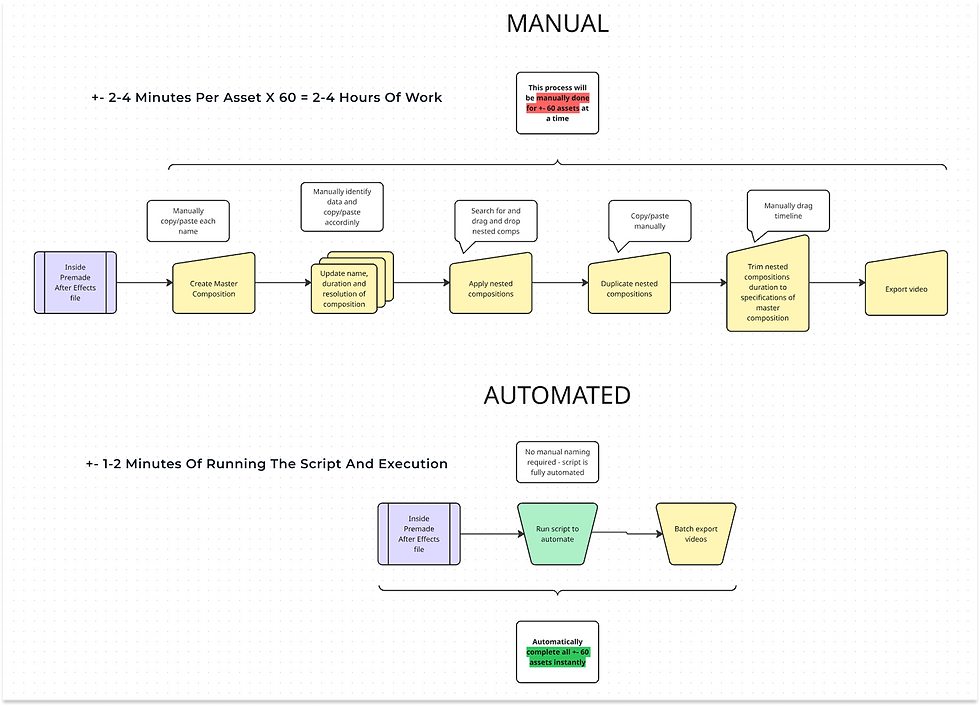
So, what does this process really look like? Let me demonstrate with a comparative flow diagram.
The long and short of it: this doesn’t save minutes or hours, it saves days. And because of the scaling effect, if used correctly - it could save months of time.
With AI collaboration, I developed a JavaScript automation that reduced the manual process of creating multiple After Effects compositions to just 1–2 minutes. This reflects my ability to identify opportunities, reimagine workflows, and provide alternative solutions that enhance communication and business processes.

PROMPTING
The concept was clear, but prompting Copilot to translate my vision into code became an engaging exercise. Each deliverable carried metadata in its filename—project number, asset indicator, resolution, and duration—yet inconsistencies in naming conventions posed a challenge. To ensure the script could interpret and auto‑rename files correctly in After Effects, we standardized inputs by defining constants and validating each filename as it was imported. For example, resolutions like ‘1920x1080’ and ‘16x9’ were normalized to a single format, enabling accurate automation and consistent results.

The next step was to search the project file for the required nested compositions by isolating key variables within each original filename. This ensured the script could accurately identify and retrieve the correct comps for automation.

The master composition is prepped to be created.

The identified nested compositions were added into the master comp and trimmed to match its duration.

Once all variables were accounted for, the main script activated and prompted the user to select the file containing the master comp names. From there, it automatically generated each composition, ensuring accuracy and consistency across the project.



REFLECTION
What started as curiosity became a serendipitous discovery—automation reshaped my workflow.
POST ANALYSIS
So what do the real numbers show? This script actively serves the business by delivering measurable gains:
-
12,000% time savings on repetitive tasks
-
Reduced onboarding complexity for new users
-
Lower client costs, cutting expenses to a fraction (on billable hours)
-
Minimized resource overtime, improving work–life balance
-
Freed teams to focus on new business and projects
-
Fewer feedback rounds due to improved accuracy
-
Extended deadline buffers, reducing delivery pressure
-
Streamlined quality assurance, ensuring consistency
Back to portfolio
Next
Johannesburg
Gauteng
South Africa


Melissa Cramer © 2026